Sales reports built from the work your team already does
See pipeline, a weighted forecast, calling and channel funnels, and a rep leaderboard, built from the records your team already works in.
14-day free trial, no card required.
Last reviewed 2026-10-24 · Owner: Pixelwand Team
- Plan for the rep leaderboard
- Growth+
- Forecast: deal value times stage probability
- Weighted
- Channel funnels: call, email, SMS, WhatsApp
- 4
- Filter any report to one rep
- Per rep
Why teams look for this
Weekly reviews turn into spreadsheet work: someone exports leads, calls and deals, and the numbers are stale by the time they are read.
Managers see closed deals but not the activity behind them, so there is little to coach on until a quarter has already gone wrong.
Pixelwand reports are built from the same records reps work in, so the pipeline, the calls and the follow-up are already counted.
Who it is for — and who it is not for
A good fit if you
- want a weekly view of pipeline, calls and follow-up without building a spreadsheet
- need managers to see rep activity and revenue won side by side
- want to see which lead sources turn into deals
- log calls and messages in Pixelwand
Not a fit if you
- need commit and upside forecast categories
- expect the rep leaderboard on the Lite plan
- need revenue recognition or finance reporting
- want reports on activity that happens outside Pixelwand
The workflow, step by step
- STEP 1
Set up the inputs
Set stage probabilities and require expected close date and deal value if you want the forecast populated.
- STEP 2
Work as usual
Work leads and deals as usual. Calls, emails, messages and stage moves are counted as they happen.
- STEP 3
Pick a period
Open Reports, pick a period and compare it with the previous one. Filter to one rep if you need to.
- STEP 4
Read the charts
Read the pipeline charts, the forecast, the call and channel funnels and, on Growth and above, the rep leaderboard.
- STEP 5
Make it yours
Add your own charts and, as an admin, save the layout for the team.
What it looks like
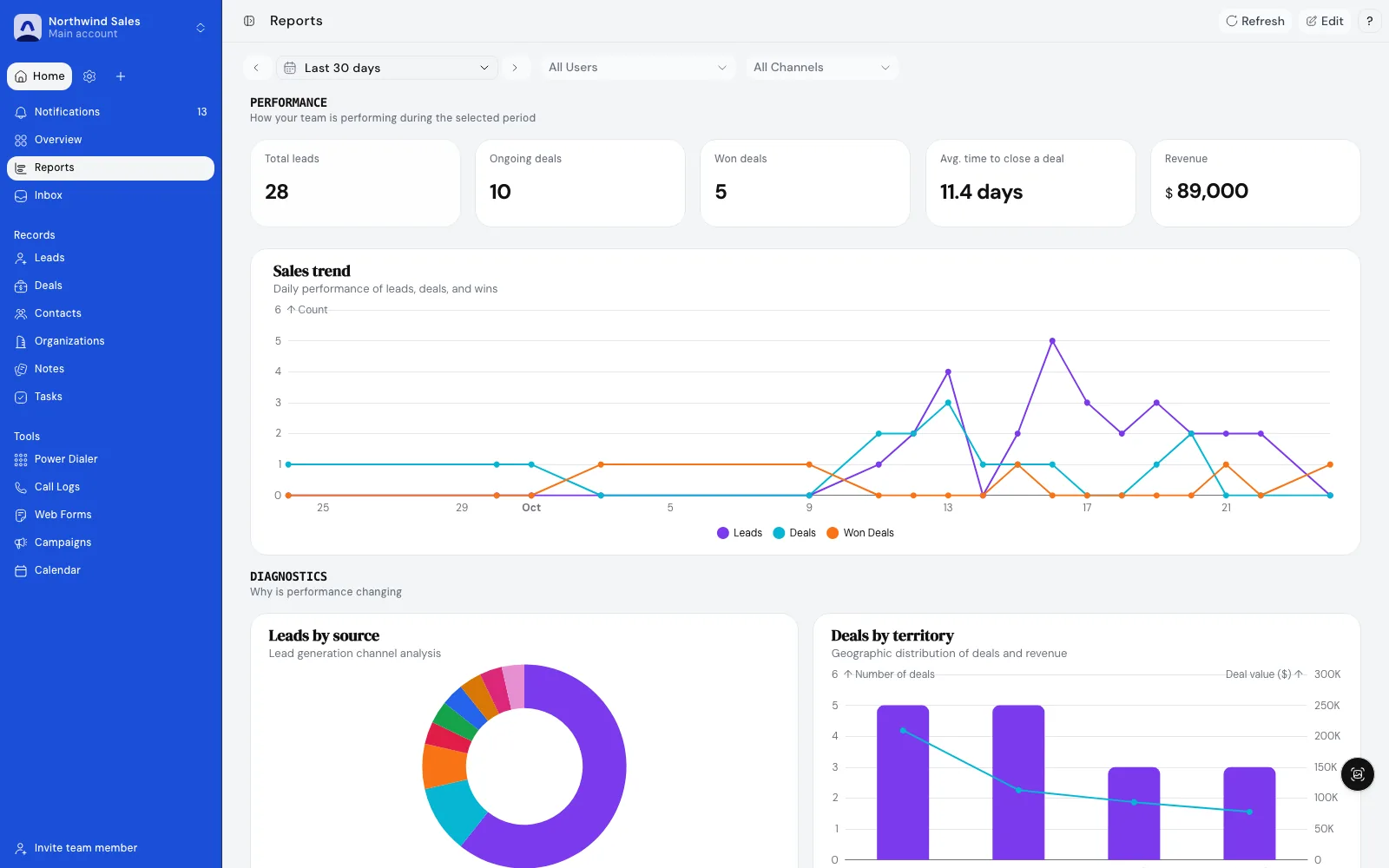
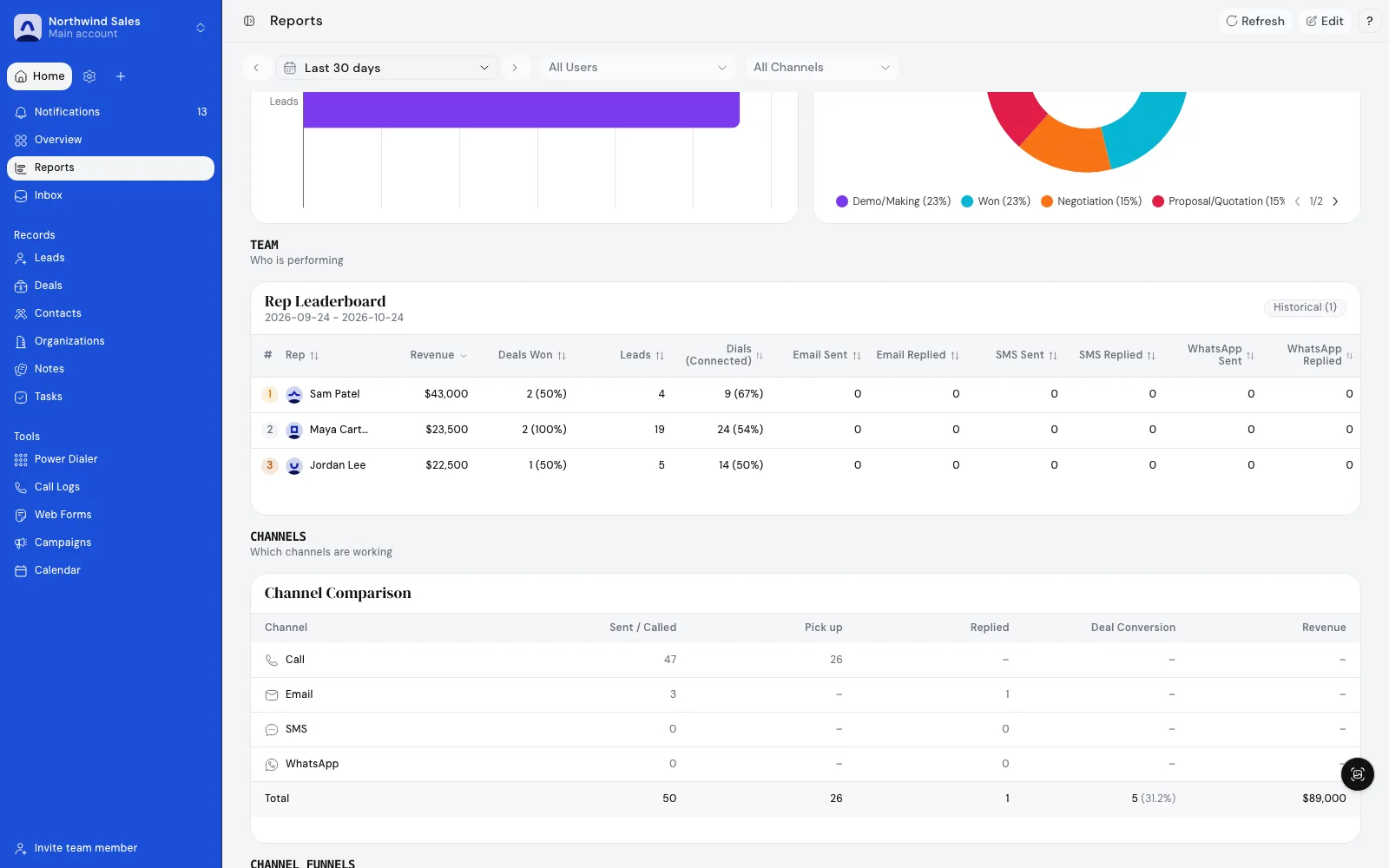
Screenshots show demo data.
What is included — and the limits
Included
- A team dashboard with leads, ongoing and won deals, average deal value and average time to close.
- Pipeline charts: deals by stage, by source, by territory and by salesperson, plus a funnel and lost deal reasons.
- A weighted revenue forecast: expected deal value times the stage probability, over expected close date.
- Calling metrics: dials, pick-ups, pick-up rate, calls booked and a call funnel.
- Funnels for email, SMS and WhatsApp activity and a channel comparison.
- A rep leaderboard ranked by revenue won, with call and activity columns (Growth and above).
- Period filters, change against the previous period on the headline numbers, and a filter by rep.
- Add your own charts, and admins can set the team layout and reset it to the default.
Limits
- The forecast is weighted by stage probability. There are no commit or upside categories.
- The rep leaderboard, team section and campaign funnel reports start on Growth.
- Team members see their own numbers; team-wide comparisons are for admins and owners.
- Reports reflect only activity logged in Pixelwand.
- Pixelwand is a sales CRM. Revenue recognition and finance reporting belong in finance tools.
How teams use it day to day
Weekly pipeline review
Open one dashboard on Monday: deals by stage, the weighted forecast and the calls made last week, compared with the week before.
Rep performance
Compare reps on revenue won, dials and pick-up rate so coaching starts from what happened.
Lead source quality
Check which sources bring leads that become deals, then put the next form or list where it works.
Channel mix
Compare call, email, SMS and WhatsApp funnels to see where outreach is landing.
Frequently asked questions
How is the forecast calculated?
The forecast is weighted: each deal’s expected value times its stage probability, charted by expected close date. You set the probability per stage. Turning on forecasting in settings makes expected close date and expected deal value required on deals.
Which reports are on which plan?
The base dashboard is on every plan. The rep leaderboard, the team section and campaign funnel reports start on Growth. See /pricing for the current plan table.
What can a rep see compared with a manager?
Team members see their own performance. Admins and owners see team-wide comparisons such as the leaderboard and deals by salesperson.
Can I build my own charts?
Yes. Add a chart from the chart picker and choose a number, axis or donut chart, or a channel table. Admins can save the team layout and reset it to the default.
Do reports cover calls and messages?
Calls (dials, pick-ups, pick-up rate, calls booked), email, SMS and WhatsApp each have a funnel, and a comparison puts the channels side by side.
Where do the numbers come from?
The numbers come from the records your team already works in. A report is only as complete as the activity logged, so calls, emails and stage moves need to happen in Pixelwand.
Stages, probabilities and the forecast behind the charts.
The calls and dispositions that feed the call metrics.
Funnel and open reports for sequences.
Lead sources that show which forms convert.
Plan limits for the leaderboard and funnel reports.
Size your pipeline against a target.
What the data says about stalled and slow deals.
Which lead sources convert, by the numbers.
Start closing
more deals today.
Join high-growth sales teams automating their busywork with Pixelwand.
"Just on WhatsApp, [Deependra] has been recommending me features and helping me out wherever I'm stuck with the CRM."