Pipeline visibility you can forecast from
Define your stages, set honest probabilities, and get a weighted forecast that updates as reps work.
14-day free trial, no card required.
Last reviewed 2026-10-07 · Owner: Pixelwand Team
- Forecast: deal value times stage probability
- Weighted
- Stage moves, kept in deal history
- Drag-and-drop
- Statuses, fields and layouts
- Custom
Why teams look for this
Forecasts built in spreadsheets are negotiations, not measurements. Reps shade the numbers, managers re-shade them, and the board sees fiction with two rounds of edits.
Meanwhile stalled deals hide in long lists. Nobody owns the silence between stage moves, so pipeline reviews become archaeology.
Pixelwand ties the forecast to the work: probabilities per stage, every touch on the timeline, and filters that show which deals have gone quiet.
Who it is for — and who it is not for
A good fit if you
- run staged deals with values and close dates worth forecasting
- want one shared, probability-weighted view of the pipeline for reviews
- need a way to find deals that have not moved without scanning a long list
- customize stages, probabilities and fields per team
Not a fit if you
- track one-off transactions with no stages or follow-up
- need revenue recognition or accounting inside the CRM
- want forecasts without maintaining stage probabilities
The workflow, step by step
- STEP 1
Define stages with probabilities
Model your motion with custom statuses — names, colors and probabilities that match how your team actually sells.
- STEP 2
Work deals through the stages
Qualify leads into deals on the right stage. Drag-and-drop moves keep history intact on the deal timeline.
- STEP 3
Forecast from the pipeline itself
Watch the weighted forecast update as values, stages and probabilities change.
- STEP 4
Catch stalls before reviews do
Filter for deals without recent movement, re-engage across call, SMS, WhatsApp or email, and close out what is truly dead.
What it looks like
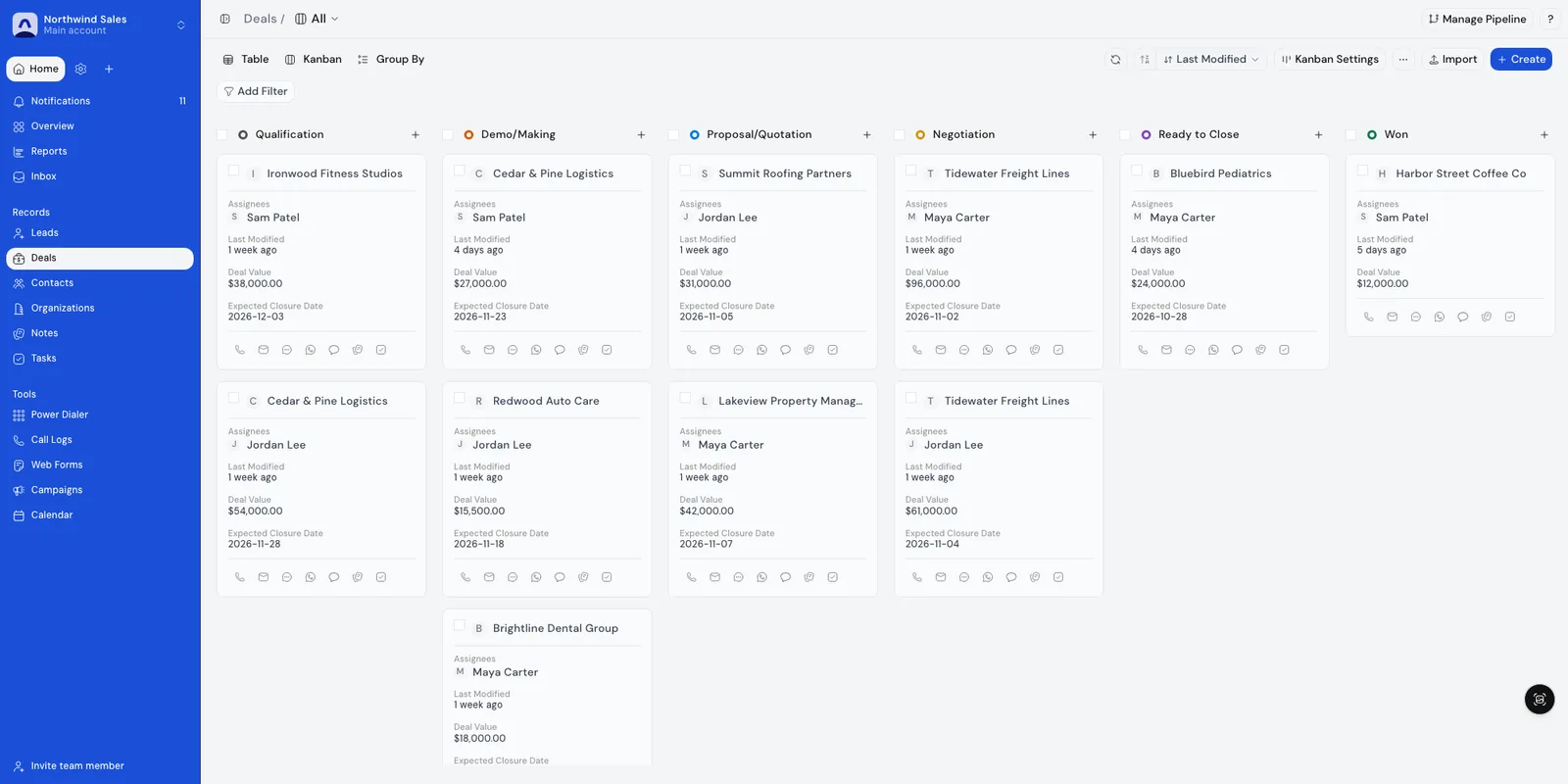
Screenshots show demo data.
What is included — and the limits
Included
- Deal pipelines with stages your team defines, each carrying a probability you set.
- A weighted revenue forecast rolled up from deal values and stage probabilities.
- Drag-and-drop stage moves with full history on the deal timeline.
- Filters and saved list views to find deals that have not been updated.
- Dashboard charts for funnel conversion, average time to close and call activity.
- Custom statuses, fields and layouts for teams with their own sales language.
Limits
- Forecasts are only as honest as stage probabilities — set them from your own conversion history, not defaults.
- Pipeline management covers selling motion, not project delivery, invoicing or accounting.
- Advanced revenue recognition and multi-currency consolidation belong in finance tooling.
LiveWorks with the live Google Calendar integration.
How teams use it day to day
Weekly forecast reviews
Stages mirror the real sales motion with probabilities from past conversion. Monday’s review opens on the weighted forecast, not on anecdotes.
Stalled-deal cleanup
Filter the deal list for records that have not been updated recently, so reps re-engage or close them out instead of letting them rot.
Manager coaching from conversion data
Conversion by stage and rep activity show where deals actually slow down, giving managers something concrete to coach.
Frequently asked questions
How does forecasting work?
Each stage carries a probability between 0 and 100 that your team sets. The forecast is weighted: expected deal value times the stage probability, charted by expected close date. Turning on forecasting in settings makes expected close date and expected deal value mandatory on deals.
Can we define our own stages?
Yes. Pipelines use custom statuses with your own names, colors and probabilities, plus custom fields and layouts per team.
What history does a deal keep?
Every stage move, call, message and note lands on the deal timeline, so anyone opening the deal sees how it got where it is.
What does pipeline management not replace?
It replaces the spreadsheet and the status meeting, not delivery, accounting or project tooling. Those stay where they are.
Queues and dispositions that turn call blocks into pipeline.
Drafts, task extraction and card scanning that keep deals current.
The sales-execution CRM the pipeline lives in.
Meetings and follow-ups synced against deal timelines.
Coverage math that keeps a pipeline honest.
How coverage ratios work and what healthy looks like.
Start closing
more deals today.
Join high-growth sales teams automating their busywork with Pixelwand.
"Just on WhatsApp, [Deependra] has been recommending me features and helping me out wherever I'm stuck with the CRM."