AI that drafts, you that decides
Draft follow-ups from record history, extract tasks from notes and scan cards into leads — with a human reviewing everything before it moves.
14-day free trial, no card required.
Last reviewed 2026-10-07 · Owner: Pixelwand Team
- AI helpers: drafts, task extraction, card scans
- 3
- Autonomous sends: a person reviews every draft
- 0
- Plan for AI call summaries
- Premium+
- Per-plan AI usage, visible to admins
- Credits
Why teams look for this
Reps spend hours a week on sales administration: rewriting the same follow-up, copying call notes into tasks, typing in business cards after events. None of it closes deals; all of it delays the next touch.
Fully autonomous AI promises to remove the human entirely — and removes the judgment that actually wins B2B deals along with it.
Pixelwand assists instead of replacing: drafts from real record history, tasks from real notes, leads from real cards — with a person approving everything.
Who it is for — and who it is not for
A good fit if you
- spend too much of the week writing follow-ups from scratch
- take call notes that should become tasks but rarely do
- collect business cards at events worth capturing the same day
- want assistance with a human approving everything outbound
Not a fit if you
- want AI to sell, negotiate or send without approval
- expect win-rate guarantees from automation
- run outreach without keeping records AI can read
The workflow, step by step
- STEP 1
Build record history by selling
Work normally — calls, messages, meetings and notes all land on the record timeline and become the context AI reads.
- STEP 2
Draft and extract with assistance
Ask for a follow-up draft grounded in that history, or let note-taking surface extracted tasks with dates.
- STEP 3
Review everything
Read every draft and every task. Edit, approve or discard — nothing reaches a prospect or a teammate unreviewed.
- STEP 4
Send, then keep the loop going
Send approved follow-ups over email, SMS or WhatsApp, and watch outcomes log back to the timeline for the next draft.
What it looks like
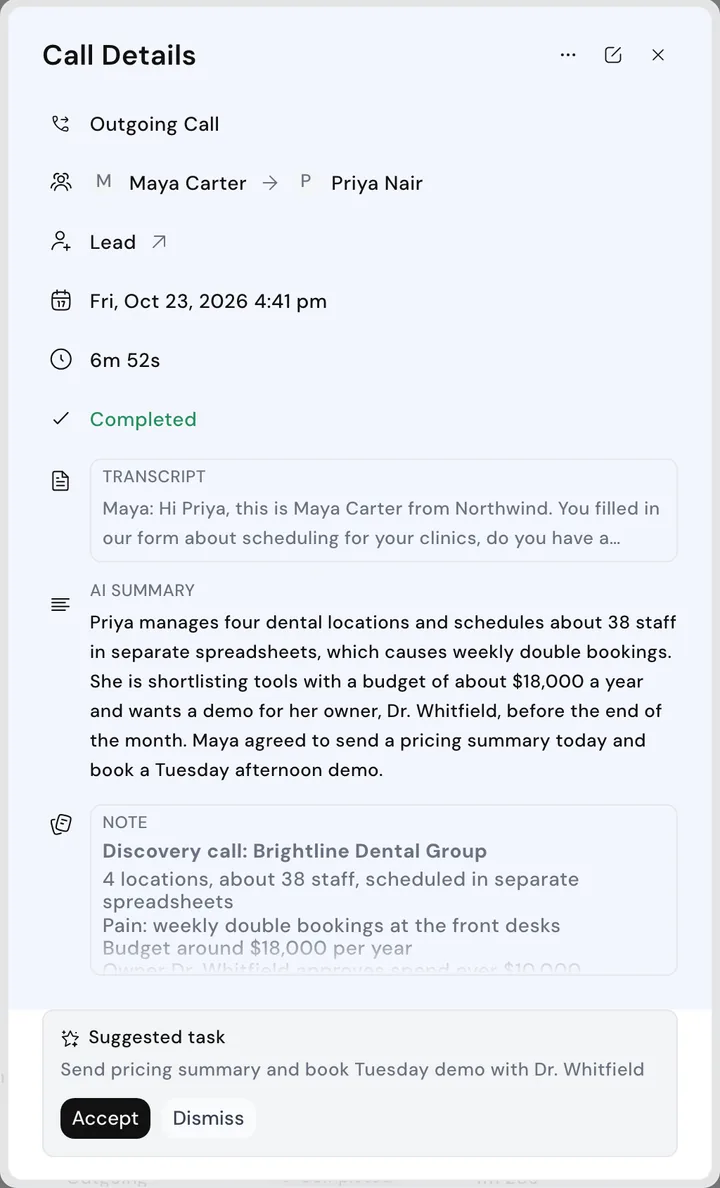
Screenshots show demo data.
What is included — and the limits
Included
- Follow-up drafts written from the record’s calls, messages and notes — reviewed and sent by a person.
- Task extraction that turns conversation notes into dated follow-up tasks.
- Business-card scanning that creates enriched leads from a photo.
- Call and message context on every record so drafts reference the real history.
- Per-plan AI credits with usage visible to admins.
Limits
- Every AI draft and extracted task requires human review — autonomous sending is not offered and not on the roadmap.
- No performance-lift claims: automation saves admin effort, but win rates depend on your motion.
- AI actions consume plan credits; heavy teams should check allowances on /pricing.
- Drafts reference record history, so thin records with no notes produce thin drafts.
LiveWorks with the live WhatsApp integration.
How teams use it day to day
Follow-ups in minutes
After a call, open a draft built from the call history and notes, adjust the tone, and send — minutes instead of half an hour.
Notes that become next steps
Paste or dictate call notes and get dated tasks back: call-backs, proposals, intros. Review, adjust, assign.
Event cards captured same-day
Photograph cards at an event and get enriched leads the same day, ready for a queue instead of a desk drawer.
Frequently asked questions
What does Pixelwand AI actually do?
AI drafts follow-ups from the record history, extracts tasks from notes and scans business cards into leads. A person reviews every draft and every task before anything is sent or assigned.
Does the AI contact prospects on its own?
No. Drafts wait for human approval and nothing contacts a prospect autonomously. The product assists sellers; it does not sell on its own.
How is AI usage billed?
AI operations such as drafts, task extraction and card scans consume AI credits under your plan. Check /pricing for current credit allowances.
What makes drafts good or bad?
Draft quality follows record quality: the more calls, messages and notes on the timeline, the more specific the draft. Thin records produce generic drafts.
Turn worked calls into stages, probabilities and forecast.
Queues and dispositions that generate the history AI drafts from.
The sales-execution CRM the automation lives in.
Reviewed drafts go out over two-way deal-card messaging.
Plans, AI credits and trial terms.
Why activity logging is the bottleneck automation should remove.
Start closing
more deals today.
Join high-growth sales teams automating their busywork with Pixelwand.
"Just on WhatsApp, [Deependra] has been recommending me features and helping me out wherever I'm stuck with the CRM."