The AI-native CRM that fills itself in
Every call, message, email and note lands on the record by itself, and AI agents and assistants work on that record for you. Your team spends its time on conversations and booked meetings, not on updating the CRM.
14-day free trial, no card required.
Last reviewed 2026-11-16 · Owner: Pixelwand Team
- Record types in one workspace
- 4
- Channels on one timeline
- 4
- Pipeline stages and fields
- Yours
Why teams look for this
A CRM goes stale because keeping it current is a job nobody wants. Reps do the work, then update the record later, and half of it never gets written down.
That is also why AI helps so little in most CRMs. An assistant working from an empty or out-of-date record has nothing to go on, so the research and the follow-ups still land on the rep.
Pixelwand’s CRM takes the other route. Calls, messages and emails land on the record by themselves, AI writes the notes and the next task, and agents and assistants read and write the same record your team works in.
Who it is for — and who it is not for
A good fit if you
- want the CRM to stay current without reps spending their day updating it
- run outbound or inbound with a small, fast sales team
- manage calling or outreach for several clients and need a separate space for each
- want Claude, ChatGPT or agents to work on the same records the team uses
- are moving off spreadsheets or a heavier CRM
Not a fit if you
- need project delivery, invoicing or retainer tracking inside the CRM
- need a native two-way sync with HubSpot or Pipedrive today
- want AI that contacts prospects with no review
The workflow, step by step
- STEP 1
Capture every lead in one list
Bring leads in from web forms, Apollo, business-card scans or a CSV import. Duplicate detection runs on the way in so the list starts clean.
- STEP 2
Qualify into a pipeline you define
Qualify leads into deals on stages you define, each with a probability that rolls up into a weighted forecast.
- STEP 3
Work deals across every channel
Call, text, message on WhatsApp and email from the record. Every touch is logged on the timeline by itself.
- STEP 4
Let the record fill itself
AI writes the call summary and the next task, agents research the account and draft the follow-up, and your assistant can update the record from Claude or ChatGPT.
- STEP 5
Review and forecast
Check the pipeline, the forecast and the leaderboard, and see which deals need a push this week.
What it looks like
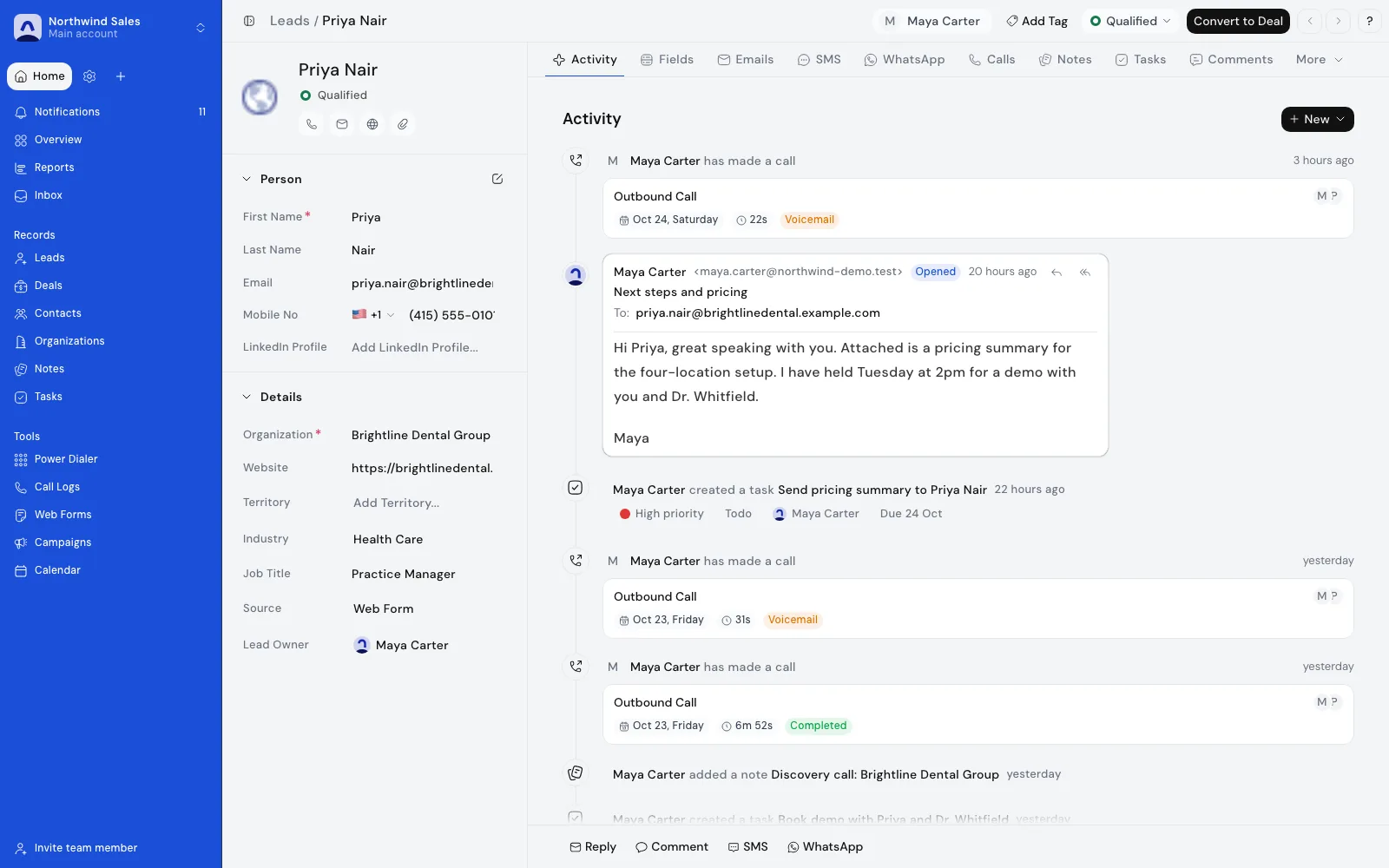
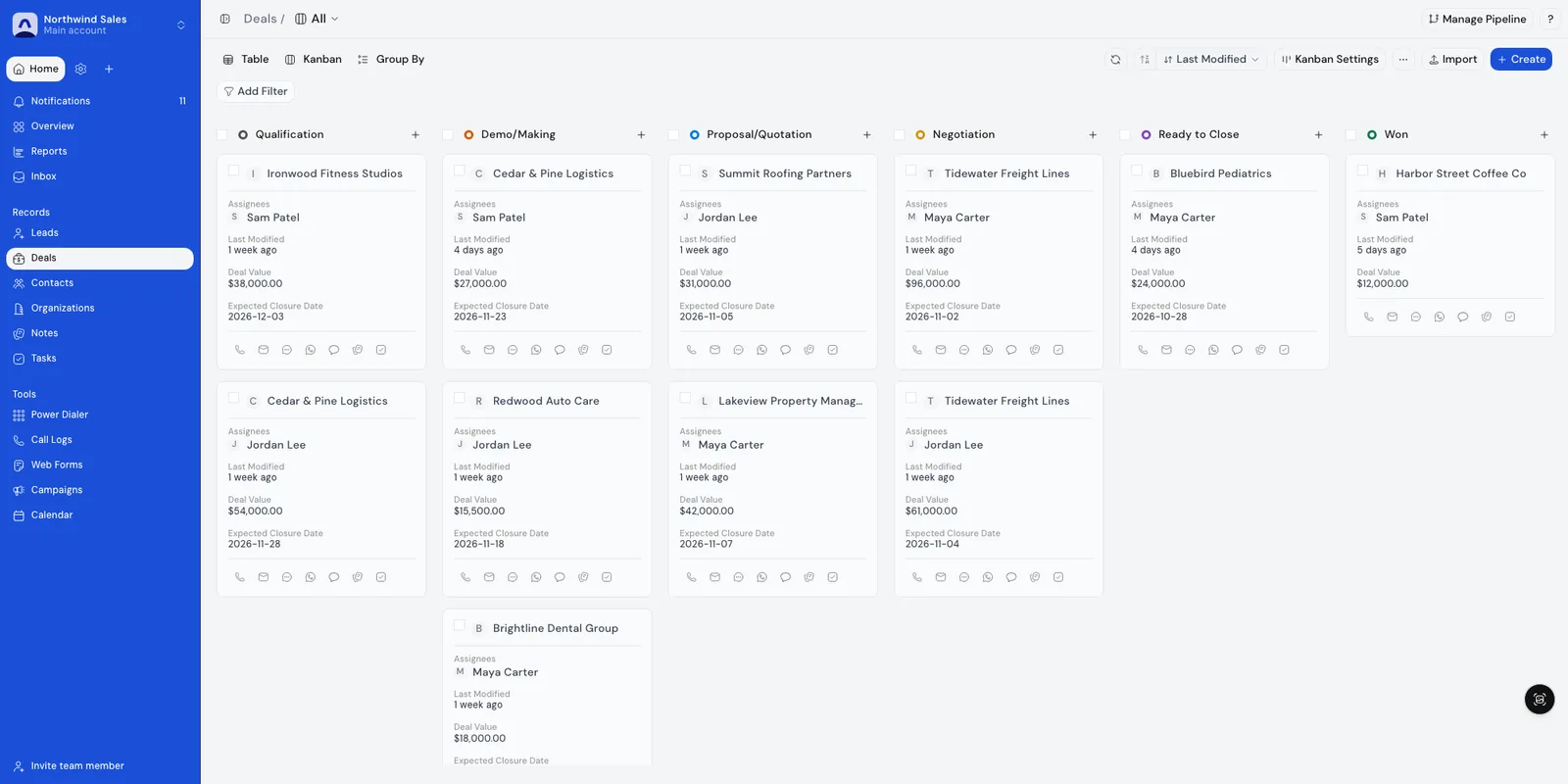
Screenshots show demo data.
What is included — and the limits
Included
- Leads, contacts, organizations and deals in one workspace, each with a timeline of every call, message, email and note.
- Calls, SMS, WhatsApp and email logged to the record automatically, so nobody types an update after the work is done.
- An inbox for your email, SMS and WhatsApp conversations, tied to the lead or deal they belong to.
- Pipeline stages you define, each with a probability that feeds a weighted forecast.
- Custom statuses and fields, so the CRM matches how your team sells.
- List and board views, filters and saved views for every team member.
- Assignment rules that route new leads to the right rep (Growth and above).
- Team roles and a sales hierarchy that decide who sees which records.
- Sub-accounts: a separate space for each client or team, with its own leads, queues and call history, switched from the account switcher.
- Tasks, notes and a calendar with Google Calendar and Cal.com booking.
- AI that does the admin: call summaries and follow-up tasks (Premium and above), follow-up drafts, account research, agents you describe, and an MCP server so Claude or ChatGPT can update records.
- CSV import with duplicate detection for moving an existing pipeline in.
Limits
- Pixelwand is a sales-execution CRM, not project, delivery, invoicing or accounting software.
- Calling and SMS need a connected Twilio account, and WhatsApp needs a connected WhatsApp Business number.
- AI output is a draft for review. Call summaries and transcripts are on Premium and above, and agents are in beta and turned on per workspace.
- Migration runs over CSV today. A native two-way sync with HubSpot or Pipedrive is not available yet.
LiveWorks with the live WhatsApp integration.
How teams use it day to day
Founder-led sales
Replace the spreadsheet with one pipeline. Every call, message and email lands on the record, so the picture is current without anyone updating it.
A small SDR team
Run outbound from one workspace: queues, sequences and tasks on the same leads, with call notes and the next task written for the rep.
An agency with a space per client
Give each client a sub-account with its own leads, queues and call history, and switch between them in one click.
A manager who sees the whole pipeline
Use roles and the sales hierarchy to see your team’s pipeline, and the reports to see where deals stall.
Frequently asked questions
What makes it an AI-native CRM?
The record fills itself in and AI works on it. Calls, messages and emails are logged on the lead or deal automatically, AI writes call summaries and follow-up tasks, agents research accounts and draft follow-ups, and the MCP server lets Claude or ChatGPT read and update records inside your permissions. You review what AI drafts.
Can each client or team have its own space?
Yes. Sub-accounts give each client or team a separate space with its own leads, queues and call history, so one client’s work never mixes with another’s. Switch between them from the account switcher, and invite people to the main account or to a sub-account. Statuses are shared with sub-accounts. See /pricing for what each plan includes.
Can I work in Claude or ChatGPT instead of the CRM?
Yes. Connect the MCP server and an assistant can find leads and deals, prepare follow-ups, manage tasks and read reports as the CRM user who signed in, with that user’s permissions. See /features/mcp for how to connect.
Can I move my pipeline over from another CRM?
Export leads, contacts and deals from your current tool as CSV and import them, with duplicate detection on the way in. See /migrate-to-pixelwand for the workflow. A native two-way sync with HubSpot or Pipedrive is not available yet.
Does the AI contact my leads on its own?
AI drafts and a person reviews. The starter agents never send on their own, and tasks are created only after you agree. If you build your own agent, write in its instructions what it must never do.
How is it priced?
Pricing is per seat, with the plan deciding which channels, queues and AI features you get. /pricing lists the current plans.
Agents that research, draft and follow up inside the CRM.
Work leads from Claude or ChatGPT with the MCP server.
Connect with 3x more prospects, with the notes written.
Email, SMS and WhatsApp follow-ups in one sequence.
Stages, probabilities and a weighted forecast.
Pipeline charts, forecast and a rep leaderboard.
A sub-account for each client, with its own queues.
Plans, channels and AI features by plan.
Start closing
more deals today.
Join high-growth sales teams automating their busywork with Pixelwand.
"Just on WhatsApp, [Deependra] has been recommending me features and helping me out wherever I'm stuck with the CRM."